Motorola Edge 50 Fusion Display Flickering Fix
Motorola Edge 50 Fusion Display Flickering Fix
Motorola Edge 50 Fusion Display Flickering Problem – Complete Details & Permanent Solutions
Aaj-kal Motorola Edge 50 Fusion users ke beech ek common issue notice ki ja rahi hai — display flickering, blinking, ya screen ka randomly on-off hona. Shuruat me ye problem minor lag sakti hai, lekin agar time par diagnose na ki jaye, to ye issue gradually badhta jata hai aur daily usage ko disturb karne lagta hai.
Is blog me hum detail me samjhenge:
- Display flickering kya hota hai
- Iske possible software aur hardware causes
- Aur iska actual permanent solution kya ho sakta hai
Display Flickering Kya Hota Hai?
Display flickering ka matlab hota hai screen ka baar-baar blink karna, brightness ka unstable hona, ya kabhi-kabhi poori screen 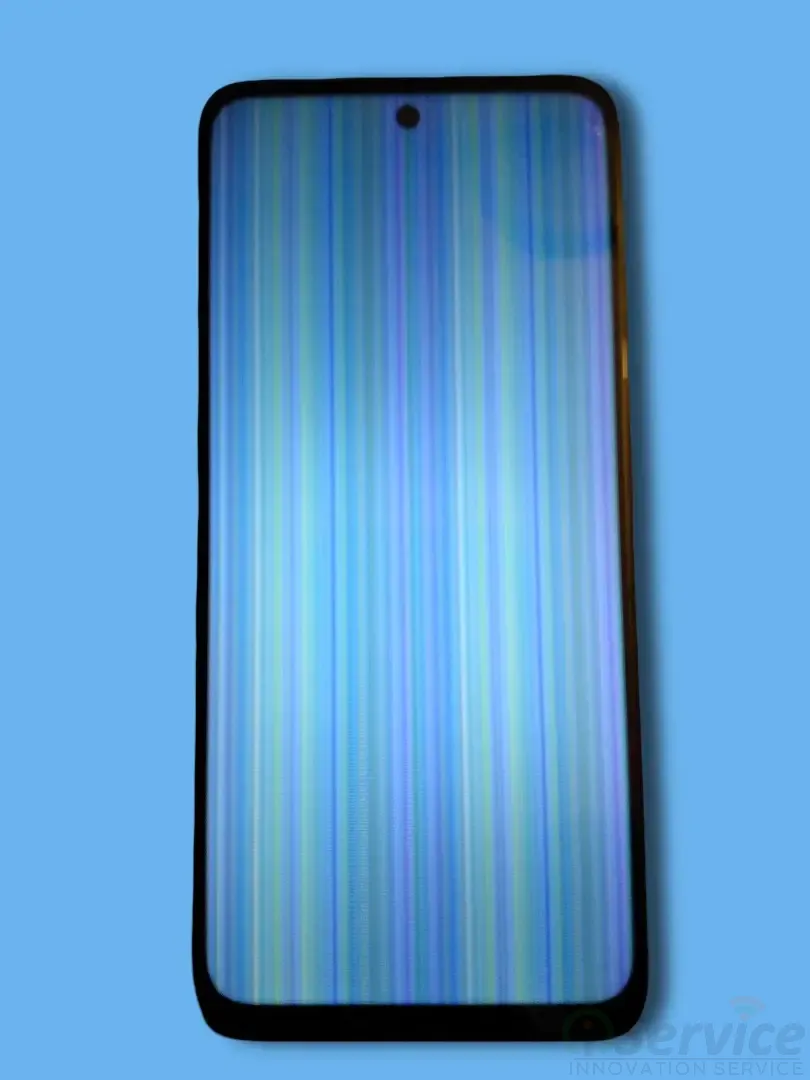 ka black ho jana.
Even though Motorola Edge 50 Fusion ek naya aur advanced smartphone hai, phir bhi kaafi users is problem ka samna kar rahe hain, jo kaafi frustrating ho sakta hai.
Isliye ye samajhna zaroori hai ki issue exactly kahan se aa raha hai — software se ya hardware se.
Possible Causes – Motorola Edge 50 Fusion Display Flickering
Display flickering ka reason software ya hardware, dono me se koi bhi ho sakta hai. Har case me display panel kharab ho, ye zaroori nahi.
1️⃣ Software / App Related Issues
Kai baar flickering ka main reason software bugs hote hain, jaise:
Outdated system software
Third-party apps ka conflict
Excessive usage ke baad system instability
Agar phone ka software update pending hai ya recently koi faulty app install hui hai, to ye problem trigger ho sakti hai.
2️⃣ Hardware Related Issues
Agar phone:
- Paani me gira ho
- Physical damage hua ho
- Overheating ke baad issue start hua ho
- to chances zyada hote hain ki problem hardware related ho.
Common hardware causes:
- Motherboard damage
- CPU related fault
- Display connector loose hona
- Power IC ya Display IC ka issue
Is tarah ke cases me display panel bilkul theek hota hai, lekin phir bhi screen flicker ya blink karti rehti hai.
Fixes – Pehle Kya Try Kare?
Har baar display replace karna solution nahi hota. Repair se pehle kuch basic checks karna zaroori hai. 
✅ 1. Software Update Check Kare
Sabse pehle ensure kare ki phone latest software version par ho. Kai baar pending updates ki wajah se system instability aati hai, jo display flickering ka cause ban sakti hai.
✅ 2. Safe Mode Test Kare
Safe Mode me phone run karke check kare. Agar Safe Mode me flickering band ho jati hai, to clearly issue kisi third-party app se related hai.
✅ 3. Proper Hardware Diagnosis
Agar software related saare steps follow karne ke baad bhi problem same rahti hai, to strong possibility hai ki issue motherboard ya internal hardware se related ho.
Har Baar Display Fault Nahi Hota
Bahut se users assume kar lete hain ki flickering ka matlab display kharab ho gaya hai. Lekin Motorola Edge 50 Fusion ke kaafi cases me ye assumption galat prove hoti hai.
Generally:
- Display bilkul new jaisa hota hai
- Touch perfectly kaam kar raha hota hai
- Issue motherboard se aa raha hota hai
- Bina proper diagnosis ke display replace karna time aur paise dono ki waste ho sakta hai.
Permanent Solution Kya Hai?
Aise cases jahan display flickering hardware ya motherboard issue ki wajah se hoti hai, wahan display replacement se problem solve nahi hoti.
👉 CPU / Motherboard Chip-Level Repair hi actual permanent solution hota hai.
Is process me:
- Faulty motherboard components repair kiye jate hain
- Display ko proper power aur signal milta hai
- Phone stable aur reliable ho jata hai
- Ye long-term solution hota hai, na ki temporary fix.
Final Conclusion
Motorola Edge 50 Fusion me display flickering ek common issue ban chuki hai, lekin iska matlab ye nahi ki har baar display change karna hi solution hai.
Sabse pehle software checks, safe mode testing, aur proper hardware diagnosis karna bahut zaroori hai.
Sahi approach ke saath:
Exact problem identify hoti hai
Unnecessary display replacement avoid hota hai
Phone permanently repair ho jata hai
👉 Agar aap bhi is issue ka samna kar rahe hain, to bina guesswork ke proper diagnosis karwana hi sabse best decision hai.
Blog Post by Divya Nagotiya


